
Job Assistance
A Guide to LinkedIn Profile Optimization

In today’s digital age, your LinkedIn profile serves as your virtual first impression. With millions of professionals vying for attention, a well-optimized profile is no longer optional—it’s a necessity. A strong LinkedIn presence can significantly impact your career trajectory, whether you’re actively seeking new opportunities or simply aiming to enhance your professional reputation. This comprehensive guide, informed by an analysis of top-performing LinkedIn profile optimization blogs will equip you with actionable strategies to optimize your profile and maximize your career potential.
Key Takeaways
- Visual elements are crucial for first impressions. A professional profile picture increases views by 14 times and messages by 36 times.
- Content optimization requires showcasing your expertise effectively.
- Strategic networking and engagement are essential for profile visibility.
Crafting a Captivating Profile
Profile Picture
Your profile picture is the first visual element people encounter. A professional headshot that presents you in a positive light is crucial. Profiles with headshots are 14 times more likely to be viewed than those without, and they receive up to 36 times more messages. Ensure your picture is high-resolution (at least 400 x 400 pixels), well-lit, and clearly shows your face. A friendly and approachable demeanor can make a significant difference.
Tips for an effective profile picture:
- Location: Update your location to improve accuracy in searches and help people in your extended network know you live in their city.
- Visibility: In your profile picture settings, select “All LinkedIn Members” or “Public” to allow search engines to find your profile more easily.
Background Image
Don’t overlook the impact of your background image. Use this space strategically to showcase your personality, interests, or industry. A visually appealing image can make your profile more memorable and engaging. Consider using an image related to your profession or a visually striking picture that reflects your passions. For optimal quality, ensure the image is 1584 pixels wide by 396 pixels high (a 4:1 proportion).
Headline
Your headline is your first impression in text form. Go beyond simply stating your job title. Use this space to highlight your unique skills and value proposition. Incorporate relevant keywords to improve your profile’s searchability. For example, instead of “Marketing Manager,” consider “Data-Driven Marketing Manager | Helping Brands Achieve Growth.”
Customizing Your Profile URL
A customized URL makes your profile look more professional and easier to share. By default, your LinkedIn profile URL will have a long string of random letters and numbers at the end. You can personalize this by changing it to your first and last name or a variation that reflects your professional brand.
Multilingual Profiles
Expand your reach by creating your profile in another language. This can be particularly beneficial if you work in a global industry or are targeting international clients or employers.
Summary/About Section
Your summary is your opportunity to tell your professional story. Use this space to showcase your experience, skills, and career aspirations. Start with a strong hook that captures the reader’s attention. Highlight your key accomplishments and use keywords strategically. Keep it concise and engaging, focusing on what makes you unique and how you can add value.
Tips for writing an effective summary:
- Hook the reader: The first two lines are crucial, as LinkedIn only shows a preview. Grab attention by stating your expertise or a problem you solve. For example, “I help businesses turn clicks into customers with high-converting digital marketing strategies.”
- Show, don’t just tell: Instead of simply listing your skills, provide specific examples of how you’ve used them to achieve results.
- Avoid overused buzzwords: Focus on demonstrating your value through concrete examples and achievements rather than relying on generic terms like “experienced” or “innovative.”

Showcasing Your Expertise
Experience Section
Provide a detailed overview of your professional background. Go beyond simply listing job titles and responsibilities. Describe your accomplishments, quantifying your impact whenever possible. Use keywords relevant to your industry and target roles. Present your roles in a way that highlights your achievements and career growth.
Skills & Endorsements
Highlight your key skills and seek endorsements from colleagues and supervisors. This adds credibility to your profile and improves your visibility in searches. Focus on skills relevant to your desired career path.
Tips for optimizing your skills section:
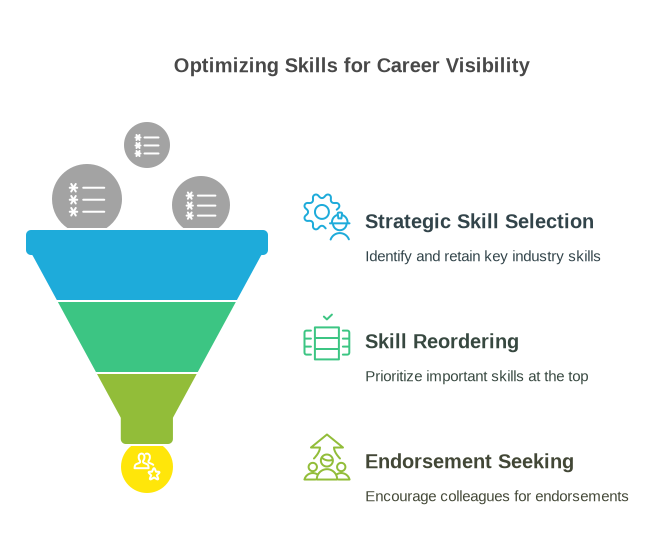
- Be strategic: Delete any meaningless skills, add skills that are key for someone in your industry and role, and reorder the list so your most important skills are on top.
- Seek endorsements: Encourage colleagues to endorse you for your key strengths. The more endorsements you have, the stronger your profile appears to potential employers or clients.
Education
Include your educational background, even if you have extensive work experience. This adds credibility and demonstrates your commitment to learning.
Certifications and Licenses
List any relevant certifications or licenses you hold. This validates your skills and expertise, making you a more attractive candidate.
Projects
Showcase your work by highlighting key projects. Provide concise descriptions and emphasize your contributions and the project’s impact.
Recommendations
Request recommendations from colleagues, supervisors, or clients. These testimonials provide valuable social proof and enhance your credibility.
Featured Section
Use the Featured section to showcase your best work, such as articles, presentations, or projects. This adds depth to your profile and allows you to demonstrate your expertise visually.
Expanding Your Network and Engagement
Growing Your Network
Connect with professionals in your field, join relevant LinkedIn groups, and participate in industry discussions. Building a strong network can lead to valuable connections and career opportunities.
Engaging with Content
Share relevant articles, industry insights, and your thoughts on trending topics. Engage with your connections’ posts by commenting and adding valuable insights. This increases your visibility and establishes you as a thought leader.
LinkedIn Learning
Take advantage of LinkedIn Learning to enhance your skills and add certifications to your profile. This demonstrates your commitment to continuous learning and makes you more discoverable to recruiters.
FAQs
What is the importance of a well-optimized LinkedIn profile?
A well-optimized LinkedIn profile is crucial for building your personal brand and helps recruiters and hiring managers find you easily. It showcases your professional skills, experiences, and achievements, making it easier for people viewing your profile to understand your qualifications.
How can I optimize my LinkedIn profile summary?
To optimize your LinkedIn summary, focus on crafting a clear, concise narrative that highlights your key experiences and skills. Use keywords relevant to your industry, and don’t be afraid to showcase your personality. This will help you stand out and make a lasting impression on those viewing your profile.
What are the best practices for a LinkedIn profile picture?
A: Use a professional profile picture for LinkedIn that reflects your personal brand. Ensure it is high-quality, well-lit, and appropriate for your industry. A friendly smile and professional attire can make a significant impact on how recruiters and hiring managers perceive you.
How should I choose a job title for my LinkedIn profile?
Your job title on LinkedIn should be clear and reflect your current role or the position you are targeting. Use industry-standard terminology that recruiters might use when searching for candidates, which helps in your profile optimization.
What is the significance of name pronunciation on a LinkedIn profile?
Including name pronunciation on your LinkedIn profile can be helpful for connections and recruiters. It ensures that people viewing your profile can pronounce your name correctly, which is important for networking and building professional relationships.
Conclusion
We understand that navigating career transitions can be overwhelming. Our team has helped thousands of professionals transform their LinkedIn profiles into powerful career tools. Don’t face this journey alone—reach out today for personalized guidance that aligns with your unique goals. Whether you’re actively job searching or building your professional brand, we’re here to help you stand out and succeed in today’s competitive landscape.
Keep Reading
More practical guidance for the financial, career and emotional side of a layoff.